Setting Up Dubsado? Do These 3 Things First
Picture this: you've just hauled a flat-pack box out of IKEA. (My happy place, BTW. I could live in those little fake apartments.)
You get it home. You open the box. And there are 47 billion pieces, 3 bags of mystery hardware, and an instruction booklet starring a little cartoon man who has clearly never struggled a day in his life.
You have two options here.
Option one: lay out every single piece, panic, and shove the whole thing in the basement "for later." (Later = never. We both know this.)
Option two: build the one shelf you actually need today, and add the rest as you go.
That, my friend, is exactly how I want you to think about setting up your CRM Dubsado.
Because here's what happens to so many creatives and wedding pros: you sign up, you log in, you see workflows and schedulers and forms and canned emails and invoices and the client portal and... your brain short-circuits.
You close the tab. And your shiny new system sits there, unbuilt, while you keep answering inquiries from your phone at 10pm like it's 2019.
I don’t want that for you. . I'm going to tell you the exact three things to set up first, why they come first, and what can absolutely wait.
Where Should You Start When Setting Up Dubsado?
Start with the three pieces your clients actually touch first: a lead capture form, one canned email response, and a scheduler or proposal. Everything else can wait.
That's it. That's the starter kit.
You don't need a perfectly built system on day one. You need something that works now. (So it can start saving you time and taking on some of the work right away.)
And the fastest way to figure out what "works" means? Start with how your clients will actually use it.
Think about your potential client's first 48 hours with you:
They inquire (that's your lead capture form)
You reply (that's your canned email)
They take the next step (that's your scheduler or proposal)
Inquiry → reply → next step. Simple. Functional. Client-friendly.
Built bit by bit.
Notice what's not on that list: workflows, automations, questionnaires, your fully branded client portal with the perfect header image you'll agonize over for two hours. (Been there. Done that. Got nothing else accomplished that day.)
Those things are great. They're just not first.
Step 1: Set Up Your Lead Capture Form
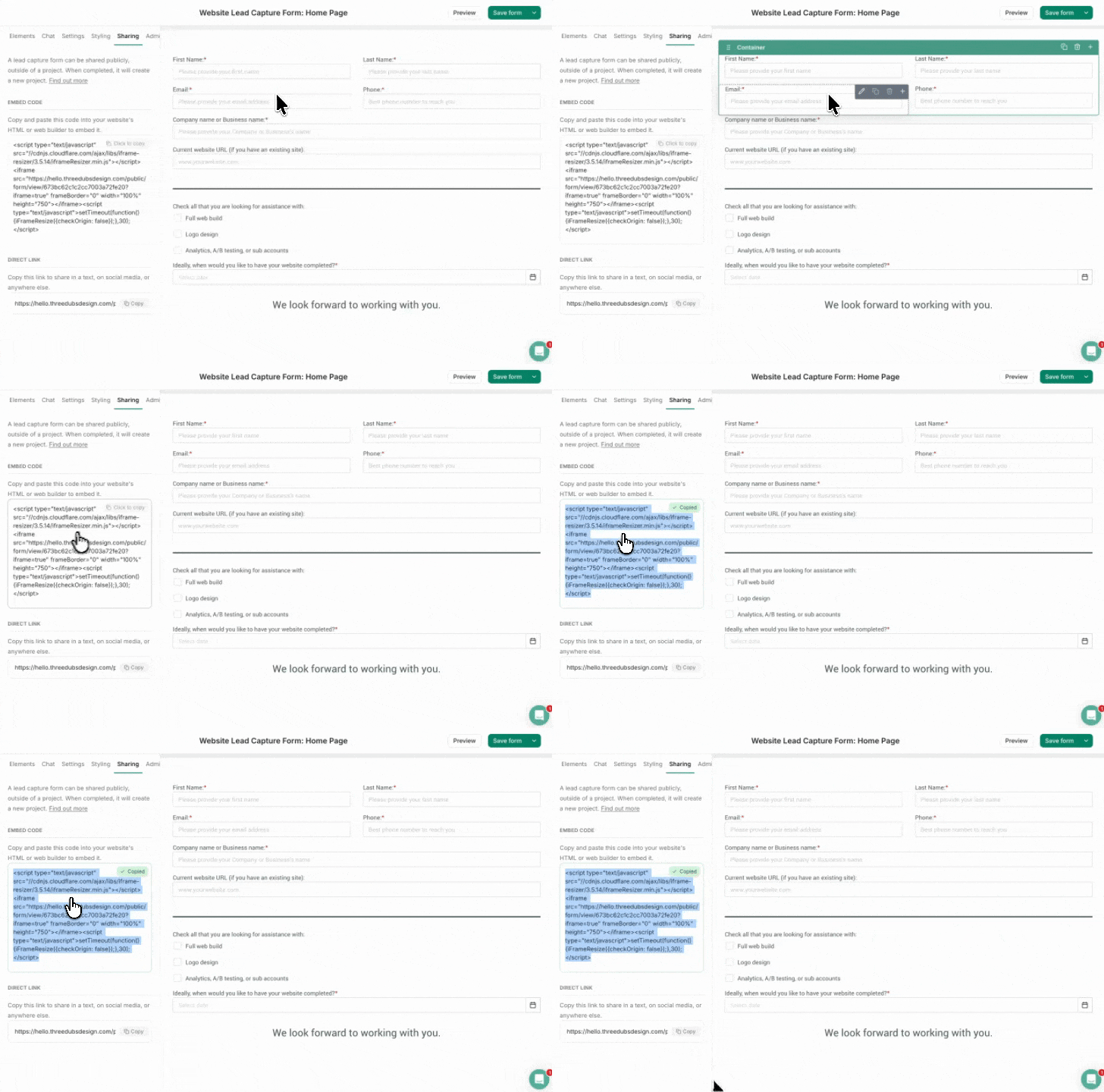
A lead capture form is a simple inquiry form that lives on your website and sends every new inquiry your way. And now, WOOHOO, it’s going to put them directly into your Dubsado—so your leads land in one organized place instead of scattered across your inbox and DMs.
This is your front door. Build it first.
Right now, your inquiries might come in through your website contact form, Instagram DMs, email, and that one vendor friend who texts you referrals. Which means details get lost, follow-ups get forgotten, and somewhere out there is a dream couple who inquired and never heard back. (I'm not trying to scare you. Okay, I'm trying to scare you a little.)
Your Dubsado lead capture form fixes that. Every inquiry creates a project, captures their details, and sits there waiting for you—date, venue, budget, how they found you, all of it.
And yes, Dubsado will still notify you in your inbox like you’re used to.
Keep it simple to start:
Their names and email
Date
Location
What they're looking for
How they found you
Don't build a 20-question intake form on day one. You can always add questions later in the process. Done is better than perfect, remember?
Share that form by embedding it on your website's contact page, and congratulations—every lead now lands in one place. One shelf: built.
Pro Tip:
Dubsado always wants to help.
Here’s their tutorial for collecting leads with a form, and their easy form creation tool.
Or their YouTube if step-by-step visuals are more your speed.
Step 2: Write One Canned Email Response
A canned email is a saved, reusable reply template in Dubsado. Write your inquiry response once, and send it in seconds every time a new lead comes in—no more rewriting the same email from scratch every single time. (We’re to save time, not waste it.)
Be honest with me: how many times have you typed out some version of "Hi! Thanks so much for reaching out, I'd love to hear more about your day..."?
Here's the thing about inquiry responses: speed wins.
Couples are often reaching out to multiple wedding pros at once, and the one who replies quickly (and confidently, and warmly) makes the best first impression. But when every reply starts from a blank screen, "I'll respond tonight" turns into "oh no, it's been four days."
So write ONE great canned email. Your inquiry response. Make it sound like you—not like everybody else saying the exact same “congratulations, give me 48 hours to get back to you”.
Most importantly: include what happens next, so they're never left wondering.
Then every time a lead comes in: open project, send canned email, done. Thirty seconds. Fully you. Zero blank-screen dread.
(Yes, you'll eventually want canned emails for booking confirmations, payment reminders, and the dreaded "just checking in!" follow-up. Later. One shelf at a time.)
Step 3: Add a Scheduler or Proposal
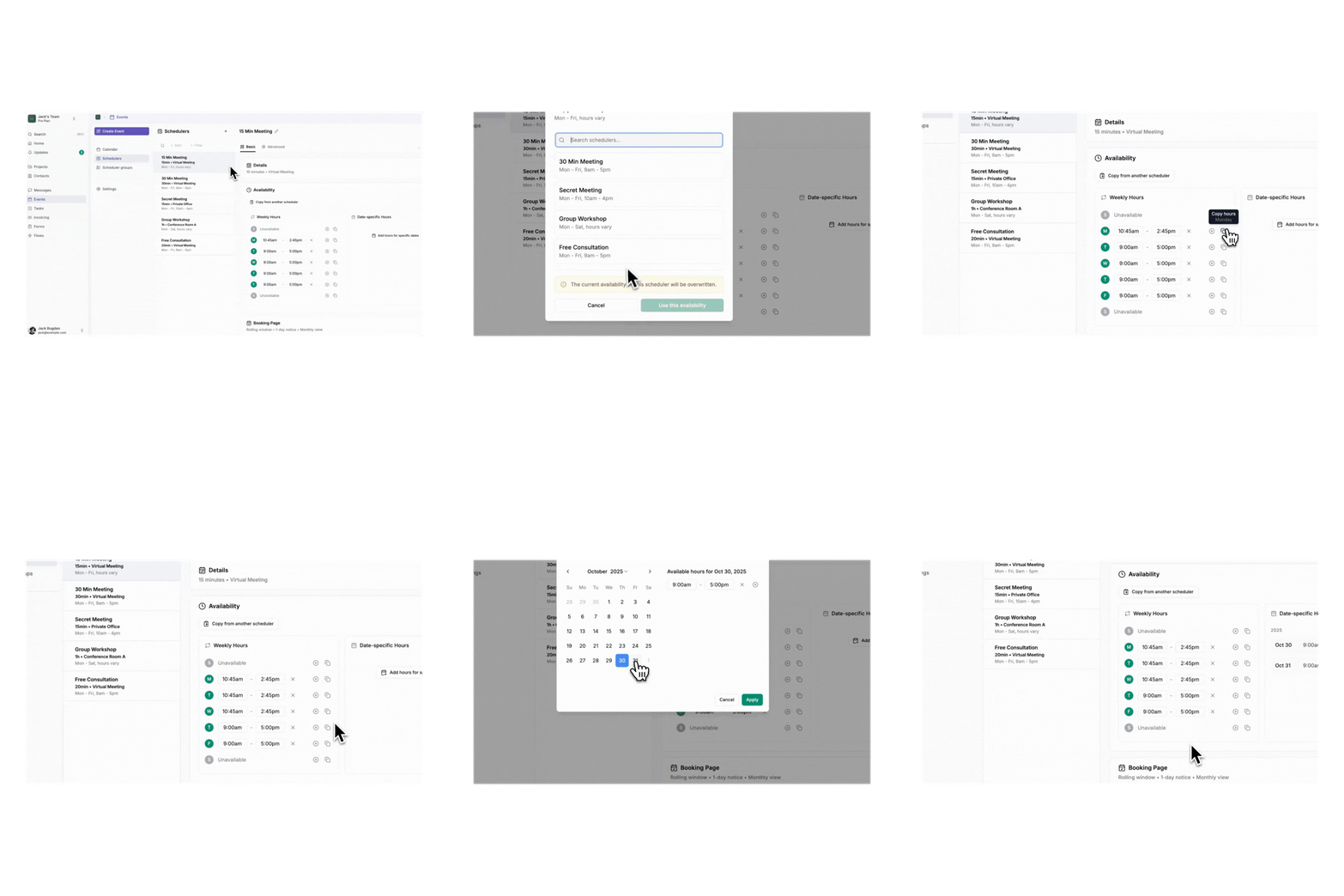
A scheduler lets leads book a consultation call straight from your calendar; while a proposal shows your packages and lets them choose one. Either gives clients a clear next step without the email back-and-forth.
This is where most inquiries die a slow death: the "what times work for you?" tennis match. You send three options. They counter with two different ones. Someone's time zone gets confused. Four days later, you've lost momentum (and possibly the booking).
Pick the tool that matches how you book:
If you do consultation calls first (most planners do) → set up the scheduler.
Share your scheduler link right into that canned email from Step 2.
They pick a time, it lands on your calendar, everybody wins.
If your process is more "here are my packages, pick one" → set up a simple proposal, by starting with one of Dubsado’s templates. Include your main offers so clients can select and move forward without waiting on you.
Now look at what you've built: a lead inquires, gets a prompt and polished reply, and books their next step — all without you frantically refreshing your inbox. That's a real, working system. With three pieces.
What Should You NOT Set Up First in Dubsado?
Skip workflows, automations, questionnaires, and heavy branding customization at the start. These layer beautifully on top of your basics, but building them first is the fastest route to overwhelm and an abandoned account.
I know. The automations are the fun part. The "my business runs while I sip my fountain Pepsi" part.
But here's why they wait: workflows automate a process. If you haven't run your simple inquiry-to-booking flow manually a few times, you don't actually know what your process is yet. You'd be automating guesses.
So for now, consider this your permission slip to ignore:
Workflows and automations—they need a process to automate first
Questionnaires—useful once you're onboarding booked clients, irrelevant until then
Client portal customization—your couples care that things work more than they care about your banner image
Every contract template you'll ever need—start with your main service agreement when you're ready, not all twelve variations
Remember, none of this is forever. It's just not first.
What Comes Next, Once the Basics Are Working?
After your lead form, canned email, and scheduler are running smoothly, layer in your contract, an invoice with a payment schedule, and then your first simple workflow connecting the steps you're already doing manually.
Once you've watched a few leads move through your three-piece system, you'll know your process — because you've lived it. That's when the layering gets good:
Your contract—so booking is signature-and-done, inside the same system
Proposal—if you opted for scheduler in step 3. You want to wrap up those offerings in a pretty little branded display, right?
Invoices and payment plans—so you're not chasing payments manually (Dubsado's automated payment reminders are worth the price of admission alone, IMO)
Your first workflow—automate the exact steps you've been doing by hand:
inquiry comes in → canned email sends → scheduler link goes outQuestionnaires and onboarding—now that you have booked clients to onboard
Each piece builds on the last. Bit by bit, shelf by shelf, until one day you realize your whole backend just... runs. And you're spending your time working with your clients, instead of playing email tennis.
How Long Does It Take to Set Up Dubsado?
Your first three pieces—lead form, canned email, and scheduler—can realistically be set up in an afternoon. A fuller build-out with contracts, invoices, and workflows typically happens gradually over several weeks. (Or even faster with a Dubsado specialist to do it for you.)
I'm not going to stand here and tell you Dubsado is a magic easy button, because it's not, and you'd never trust me again. There's a learning curve. The setup takes real time. But that’s all a part of digging in and getting to know your new fave system.
But the starter version? The version that catches your leads, replies fast, and books your calls? That's an afternoon. Maybe two, if you're a perfectionist about your canned email wording.
And an imperfect system running today beats a perfect system living in your "someday" folder. (Because we all know how awesome we are at procrastinating.)
Your Dubsado Starter Checklist
Saving you a scroll—here's the whole plan:
✅ Build a simple lead capture form and put it on your website
✅ Write one warm, on-brand canned email for inquiries
✅ Set up your scheduler (or a simple proposal)
⏸️ Everything else waits until these three are humming
Right foot, left foot, breathe. You've got this.
And if you're brand new to Dubsado — or ready to burn down your half-built setup and simplify — good news: Dubsado has a free trial of their Premier plan for 21 days, no credit card required. Plenty of time to build your three pieces and watch real leads flow through them.
Plus, as a Dubsado Ambassador, I can hook you up with 30% off when you're ready to commit — just use my code KJANDCO at checkout. 😏
Now go build your first shelf. (And maybe text me a photo when your basement-project-energy Dubsado account finally comes to life. I'll be over here, Pepsi raised in your honour.)
Dubsado promo code
Receive 30% off Dubsado software when you use my affiliate link and ambassador code: KJANDCO.
Get 30% off your first month or first year, with my link right here.
Their sales run in February and November and stack with the promo code as well.
Don’t forget to pin it!